Using Cleanlab as a Subject Matter Expert
This guide walks you through the complete SME workflow for improving your AI application using Cleanlab. No technical knowledge is required – you simply need to know how to assess the quality of AI responses and provide feedback to improve them.
This tutorial assumes that Cleanlab is already integrated with your AI app and is detecting problematic responses that need your expertise.
SME Workflow: Step-by-Step Guide
Step 1: Start with the Issues View
Begin your work in your Project’s Issues page in your Cleanlab Web App. This is where the most urgent issues are prioritized and presented for expert review and remediations.
Step 2: Review Highest Impact Issues First
Cleanlab sorts Issues for you and your team’s review default by Highest Impact, to help you focus on the most urgent, escalating Issues first. This prioritization considers:
- Frequency: How often similar queries occur
- Severity: Evaluation scores indicating the most problematic failures
This intelligent ranking helps you maximize the impact of your remediation work.
Step 3: Filter for Unaddressed Cases
By default, the filter for “Unaddressed” Issues will be applied. These are the user’s queries that need your immediate attention, and are the cases where your AI was unable to answer correctly or at all. These “Unaddressed” Issues also do not yet have a Remediation yet.
Note: Similar issues and queries are automatically clustered together, making it easier to review and remediate multiple related problems at once.
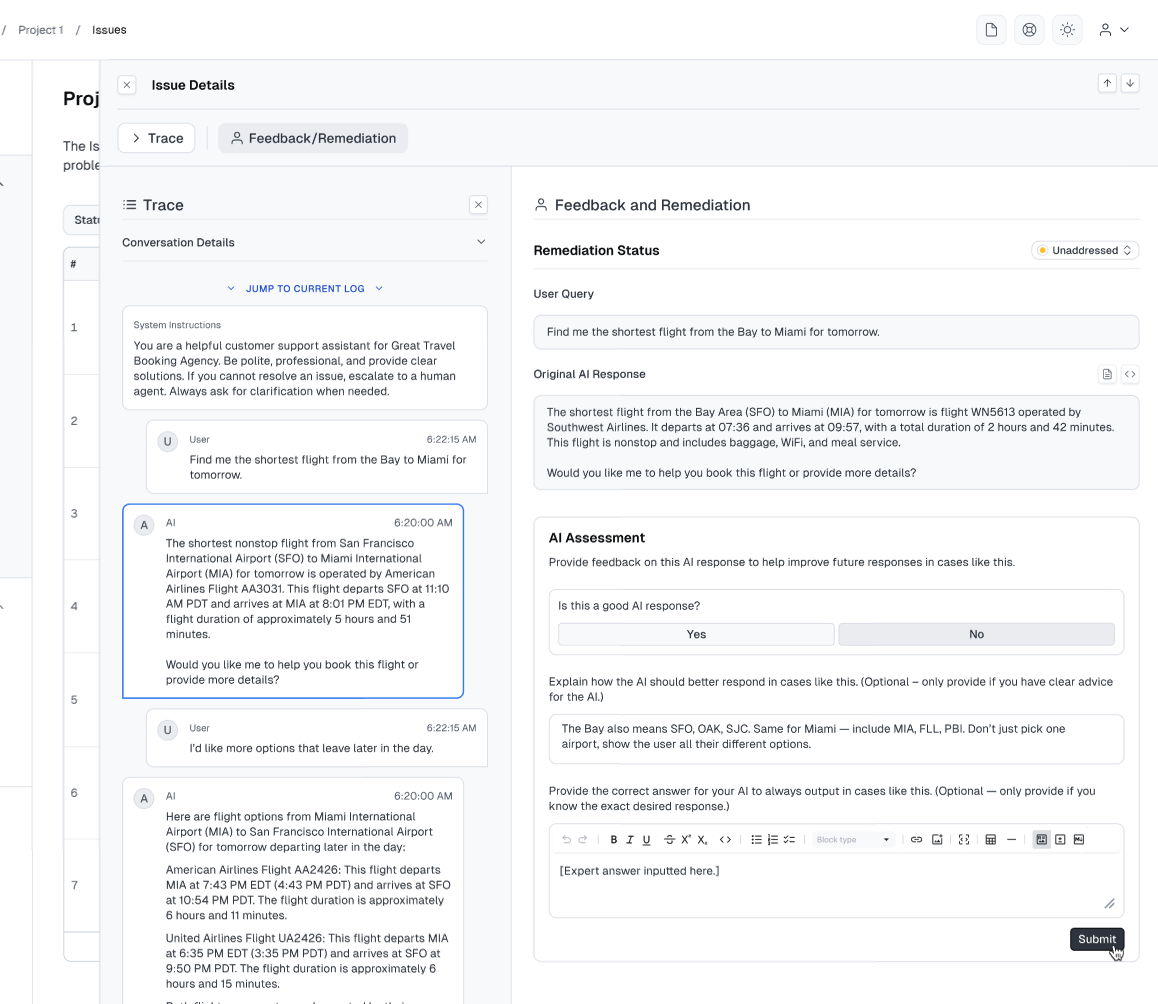
Step 4: Review Individual Issue
Click on each Issue to examine:
- The user’s original query
- The AI’s potentially problematic response
- Other relevant context and metadata
Step 5: Assess the Response and Create Remediations
SMEs are prompted: “Is this response acceptable?” with three options:
- Yes → Marks the response Good (similar AI responses will not be guardrailed)
- No → Marks the response Bad (similar AI responses will be guardrailed)
- Skip + Mark as Addressed → Closes the Issue without judging the response (marking it as addressed clears this case from the
Unaddressedview)
When you select No, you can optionally create remediations:
-
Add an Explanation (Expert Guidance): Provide natural language feedback describing what went wrong and how the AI should improve. Cleanlab automatically transforms your feedback into AI-optimized guidance that patches this issue and similar failure cases. Learn more at Expert Guidance
- Tip: Your explanation can be either a freeform, natural critique of the AI’s response or behavior (e.g., “This answer is too verbose and off topic from the user’s main intent of changing a flight. Stay on topic”), or general advice for the AI (e.g., “When users ask about flight changes, always check all relevant airports in the departure and arrival cities, not just one”).
-
Provide a Verbatim Answer for your AI to use (Expert Answer): Provide a specific answer that the AI should always serve verbatim. This creates a deterministic answer for both that query and similar future queries, instead of the AI’s original generated response. Learn more at Cleanlab Expert Answers
- Tip: Write stable, future-proof answers (e.g., “See current availability at [URL]” rather than “X units are available”).
Step 6: Move to the Next High-Impact Issue
Continue working through the prioritized list, addressing the most critical issues systematically.
Step 7: Use Advanced Filtering (Optional)
For focused remediation sessions, you can:
- Filter by Primary Issue Failure: Focus on specific problem types (e.g., hallucinations, search failures)
Step 8: Collaborate with Other SMEs
When you need help or want to distribute work:
- Tag colleagues directly via Cleanlab for specific questions
- Assign remediation work to other SMEs
- Review answers from other SMEs before adding your own
Tips for Writing Effective Expert Answers
Anticipate Missing Context
If a user’s query is missing key information, provide comprehensive responses:
Question: How do I reset my device?
Good Answer: If you are using version 14: [specific steps] If you are using version 13: [specific steps] Or if you are using version 12 or older: [specific steps]
Write Stable, Future-Proof Answers
Avoid overly specific answers that may become outdated:
Instead of: “X units are available” Write: “See current unit availability at this link: [URL]“
Empathize with Users
Think about what format would be most helpful:
- Include relevant links for additional information
- Define any technical jargon
- Use looping techniques to confirm understanding
Example:
Question: Can I get a refund if…
Better Answer: “Yes, you can get a refund if [condition]. Consider these factors: [details]. Learn more about our refund policy here: [link]“
Security and Privacy
- Never include user names or sensitive information in answers
- Remember that your answers may be shown to any future user
Advanced SME Actions
Handling Unclear Questions
If you encounter unclear questions:
- Skip if another SME might better understand the context
- Edit to make more generally applicable
- Delete if the question is nonsensical or inappropriate
Managing Outdated Remediations
If an Expert Answer or Expert Guidance Remediation becomes out of date or no longer accurate:
- Pause the remediation to temporarily disable it while retaining its history
- Review and Edit the remediation with updated information, then reactivate it
- Consider creating a new remediation if the changes are substantial
Collaborating with Team Members
Tag colleagues when you need expertise:
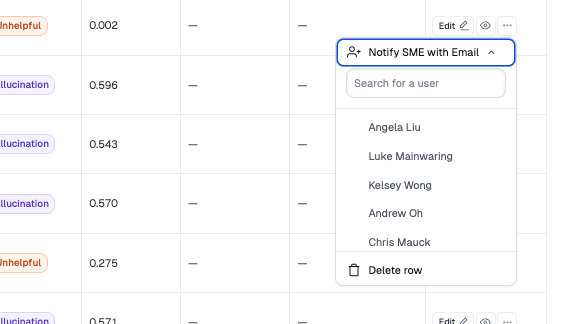
Tagged experts receive email notifications with direct links to provide their input.
Testing Your Work
Regularly test your AI application to ensure your remediations are working:
- Ask your AI the same questions you’ve remediated
- Verify the responses match your expert answers
- Test variations of the questions to ensure broad coverage
Maximizing Your Impact
Focus your time on remediations that will have the highest ROI:
- Most commonly asked questions (high frequency)
- Poorly handled by your current AI (high severity)
- Recent queries (likely to be asked again)
The Issues page’s intelligent sorting and clustering helps you identify these high-impact opportunities automatically.